Over the last months, a lot of Vyssuals work has pointed in the same direction: make the experience feel less like a collection of separate features and more like one consistent BIM data workflow.
That means the local Revit and IFC canvas, the 3D viewer, cloud model versions, shared workspaces, proposed changes, and automation graphs all need to behave like parts of the same system.
This update is about that shift.
From Separate Sharing Features to Cloud Models
Earlier versions of Vyssuals had separate concepts for shared dashboards and channels. They solved useful problems, but the mental model could become fragmented:
- A dashboard was where you analyzed model data.
- A channel was where someone else could review or edit a controlled slice of that data.
- You could upload models to both, but only one had history.
The newer direction is simpler: a cloud model is the container for model versions, and workspaces define what people can see and work on.
That distinction matters.
A cloud model can hold multiple uploaded versions. A workspace can expose the version that a specific team, consultant, or review process needs. You can keep one workspace on the current coordination model while another workspace is prepared for a focused review or comparison.
Instead of asking "is this a dashboard, channel, or model?", the question becomes:
Which model version should this workspace use, and who needs access to it?
That is a much better fit for real project work.
One Spatial View, Different Task Views
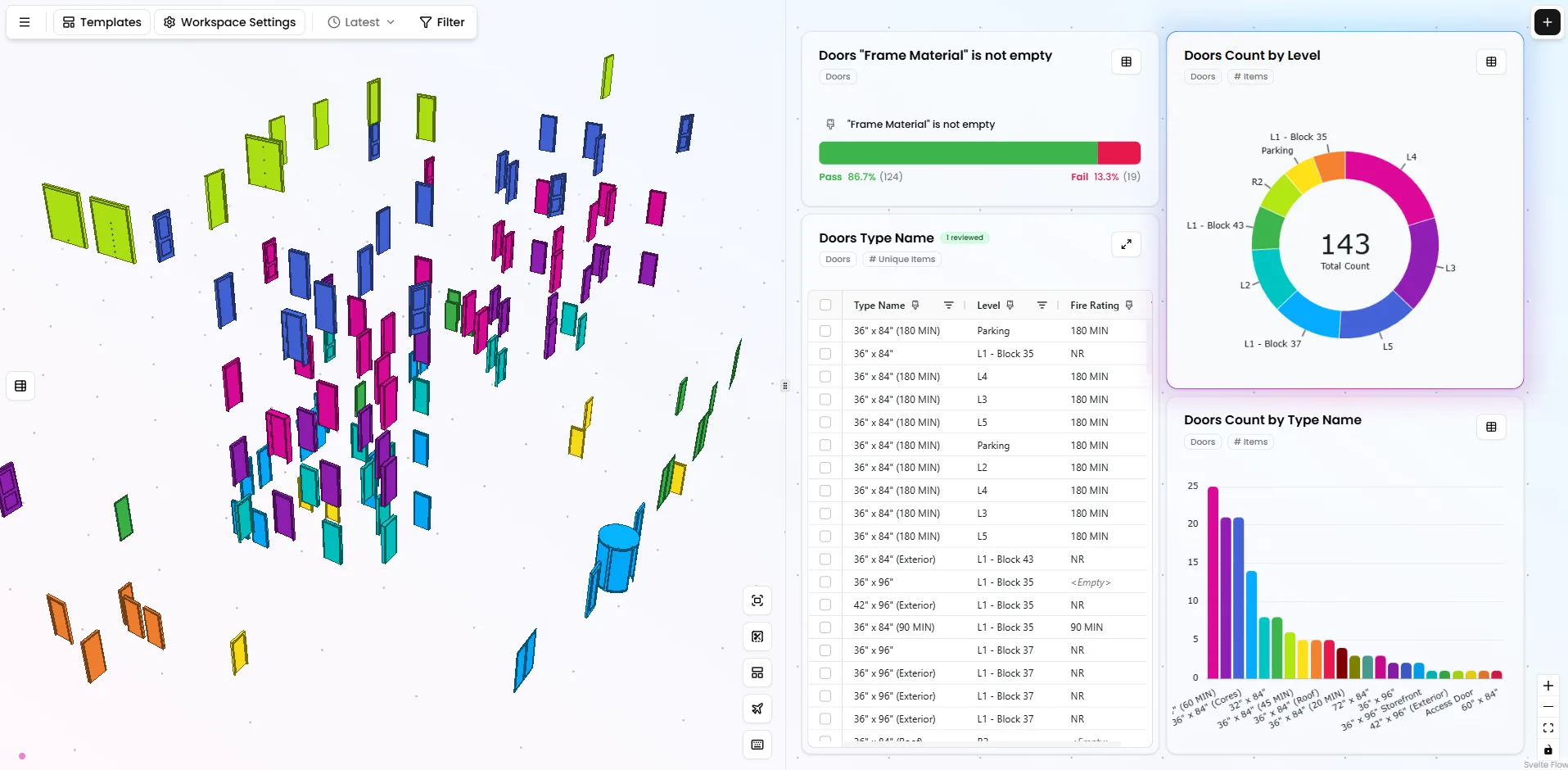
The 3D viewer has also moved closer to the center of the product, because the whole application is moving toward a clearer layout: model context on the left, task-specific work on the right.
That task on the right can change depending on what you are doing. Sometimes you are building tables, charts, and validations on the canvas. Sometimes you are editing table values. Sometimes you are reviewing proposed changes. Sometimes you are checking the result of an automation before it goes back into Revit or IFC.
The left side stays grounded in the model.
That may sound like a layout detail, but it solves two real workflow problems.
The first is cloud review.
Previously, shared dashboards could contain a 3D viewer as a node on the 2D canvas. That worked, but it also created an awkward interaction problem: you had the canvas navigation and the 3D navigation living inside each other. Scroll, pan, and zoom could feel less predictable than they should.
Channels had a different layout, with the 3D model on one side and the editable table on the other. That was closer to how people actually review model data.
The new direction brings those ideas together. In cloud workspaces, the model and the data are presented as parts of the same review surface, instead of making the 3D view feel like a separate item placed on the canvas.
The second is performance in local Revit workflows.
Vyssuals can read geometry from Revit very quickly, so showing the internal 3D viewer adds only a small cost when opening a model. After that, the payoff can be huge, especially on large models and MEP-heavy projects.
Navigating, filtering, and coloring a large model in the Vyssuals viewer is much, much faster than doing the same work in Revit's own 3D view. That speed matters when you are not just looking at the model once, but repeatedly checking data, isolating elements, reviewing changes, and moving between tables and geometry throughout the day.
So the goal is not just to show a nicer preview.
The goal is to make model-based data work feel faster and less clumsy, whether you are reviewing a cloud workspace in the browser or working locally with a live Revit connection.
The Channels Review Pattern, Everywhere
Channels already introduced one of the most important ideas in Vyssuals: a BIM person can set up a controlled review link for a manager, consultant, or external collaborator, and that person can propose data changes in a simple interface without opening Revit.
That part is not new.
What changed is that the same review pattern is becoming the general way Vyssuals handles data editing and change review.
Previously, when you worked on a canvas connected to Revit, you could double-click into a table, edit values, and send those changes back to Revit directly from the canvas. That was powerful, but it could also become unclear. The canvas was used for analysis, charting, filtering, graph building, and editing at the same time, so the line between exploring data and preparing model changes was not always obvious.
The new flow is more explicit.
When you double-click a table cell, or expand a table from the top-right corner, Vyssuals opens the dedicated review interface. The 3D model stays visible on the left. The right side switches to the task you are doing.
That task might be:
- manually editing model data in a local Revit or IFC canvas,
- reviewing changes proposed by an external collaborator,
- checking changes created by a local automation,
- or returning to canvas work for charts, tables, validations, and analysis.
The interface is familiar because it comes from Channels: model context on one side, focused table or review work on the other.
But it is no longer only for external collaboration. It is becoming the consistent place where data changes are entered, reviewed, and understood before they affect the model.
This matters because BIM data is rarely just data.
Changing a fire rating, classification, material code, room assignment, or LCA result can affect schedules, exports, responsibilities, and downstream decisions. The safest workflow is not "let everyone edit everything." The safest workflow is:
- Give the right person a controlled place to propose a change.
- Preserve enough context to understand the proposal.
- Let the model owner review the change.
- Apply it deliberately.
- Keep evidence that the review happened.
That is the pattern Vyssuals is moving toward across cloud workspaces, local Revit workflows, local IFC workflows, and automations.
Automations Are Becoming First-Class Workflows
The node graph is no longer just a canvas for one-off transformations. It is becoming a repeatable automation layer.
The recent work around formulas, add columns, table previews, create changes, strict output types, and automation containers all supports the same idea: BIM teams need reusable logic, but they also need control.
You can build a graph that:
- reads selected Revit or IFC data,
- joins it with external Excel input,
- calculates new values,
- groups and aggregates results,
- colors the model,
- creates proposed changes,
- and sends reviewed values back to Revit.
The important part is that each step remains visible.
That is different from hiding business logic inside a script, a spreadsheet macro, or a one-shot AI answer. In Vyssuals, the graph is meant to be inspectable, adjustable, and reusable by the team.
Why This Matters for Consultants and External Reviewers
The cloud model and workspace flow is designed for the messy middle of project collaboration.
Not everyone who needs to review BIM data should have to open Revit. Not everyone who knows the correct value should be allowed to change the source model directly. And not every useful review should turn into another Excel export that has to be manually reconciled later.
A better workflow looks like this:
- The BIM modeler uploads a model version.
- A workspace exposes the right version and table setup.
- An external collaborator reviews the model in the browser.
- They propose changes and add comments where needed.
- The BIM modeler reviews those proposals in context.
- Approved changes are sent back to Revit.
The collaborator gets a simpler interface. The model owner keeps control. The project gets a clearer audit trail.
That is the balance we are aiming for.
The Architecture Work Behind the UX
A lot of the recent work is not visible as a single button in the interface, but it is still important.
The product has been getting better at remembering the state of a project: which model versions exist, which workspaces use them, who proposed changes, which reviews are finished, and which rules or templates belong to the workflow.
That foundation is what makes the visible workflow more reliable:
- model versions can be tracked more cleanly,
- workspace access can be controlled more precisely,
- proposals can have a proper lifecycle,
- rule validation can run as background work,
- and cloud workspaces can open with the right model data and review context.
This is not glamorous work, but it is the difference between a demo feature and a workflow teams can depend on.
Where This Is Going
The direction is clear:
Vyssuals is becoming a system where BIM data can move between local Revit work, cloud review, controlled proposals, and repeatable automations without losing context.
The end goal is not to make everything automatic.
The goal is to make the repetitive parts easier, the risky parts reviewable, and the collaboration layer much cleaner than sending screenshots, exports, and disconnected spreadsheets around.
For teams working with Revit and IFC data, that means less friction between analysis, review, and writeback.
And that is the kind of workflow BIM data actually needs.